

Becoming a developer in 2025 is exciting but also a little overwhelming.
The tech world is moving fast, AI is everywhere, and every week there’s a “must learn” new tool making headlines. But here’s the good news: you don’t need everything. What you really need is a solid set of open source tools that will make your work easier, help you learn faster, and let you actually enjoy building things.
So, Let’s Get Started
No 1. VS Code All In One Coding Workspace
A lightweight, fast, and highly customizable code editor loved by developers everywhere. Packed with extensions, themes, and built in Git support, it’s your ultimate coding hub. If coding were cooking, VS Code would be your favorite chef’s kitchen organized, customizable, and ready for anything.
Why it’s a must-have:
-
Free and open source zero cost, endless possibilities.
-
Huge library of extensions for almost every language and framework.
-
Built-in Git support so you can manage code changes without leaving your editor.
Advice: Try extensions like Prettier (for clean code formatting) and GitLens (for version history) to level up your workflow instantly.
Read More: Top Automation Tools to Boost Productivity and Save Time
No 2. Git & GitHub Your Code’s Safety Net
Track every change in your code and roll back when things break without panic.
GitHub doubles as your public portfolio, making it easy to show off your work to employers. Here’s the truth: even the best developers make mistakes. That’s why Git exists to save you from “I broke everything” moments.
Why it’s a must-have:
-
Version control track changes, undo mistakes, and collaborate with others.
-
GitHub gives you a portfolio of your projects, which is gold when applying for jobs.
-
Contribute to other projects and learn from real-world codebases.
Insider Tip: Start small by pushing your personal projects to GitHub. Even a to do list app can show potential employers you’re active and learning.
No 3. Docker “Problem Solver”
Package your apps and all their dependencies so they run perfectly anywhere.
No more “it worked on my laptop but not on the server” headaches. If you’ve ever had your code run perfectly on your laptop but crash somewhere else, you’ll love Docker.
Why it’s a must-have:
-
Creates consistent development environments so your app works everywhere.
-
Saves time when setting up new projects.
-
Plays nicely with almost all programming languages.
Insider Tip: Learn the basics containers, images, and Docker files before diving into complex setups.
See More: Generative AI Tools: The Best Platforms to Boost Creativity and Productivity (Part 1)
No 4. Postman API Testing Without the Tears
Quickly send, test, and debug API requests without writing extra code. Perfect for learning how APIs work and for speeding up backend testing. APIs are the glue holding modern apps together, and Postman makes working with them much easier.
Why it’s a must-have:
-
Simple way to test and debug APIs without writing test scripts from scratch.
-
Great for learning how APIs work.
-
Automates repetitive testing tasks.
Tip: Save your API requests into collections it’ll make future testing way faster.
See More: How AI Powered Robots Are Changing Our World in 2025
No 5. OpenAI’s API + LangChain = Building with AI
Combine powerful AI models with your own data to create intelligent applications.
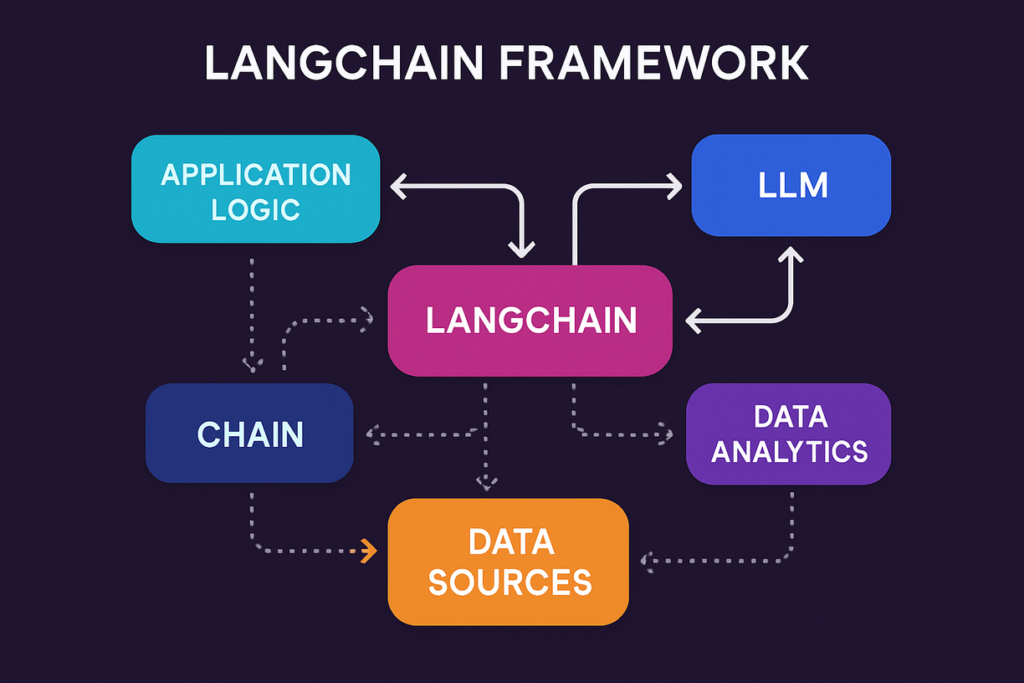
LangChain’s open source tools make it easy to build chatbots, assistants, and automation. 2025 is the year where every developer needs to know at least the basics of AI integration and open source tools like LangChain make it more approachable.
Why it’s a must have:
-
Combine AI models with your own data to create chatbots, assistants, or smart apps.
-
Huge open source community with ready to use templates.
-
Future-proof your skills by learning how AI fits into software development.
Advice: Start with small projects maybe an AI that summarizes emails or answers FAQs before moving to large scale apps.
Bonus No 6. Ollama Run AI Models on Your Own Machine
If Docker changed how developers package apps, Ollama has done something similar for AI models — it lets you download and run open source LLMs directly on your own laptop, no API key or cloud bill required. It’s become one of the most widely used AI developer tools around, with millions of monthly users.
Why it’s a must-have:
-
Run open source models locally, free from usage-based API pricing.
-
Great for experimenting with AI features before committing to a paid API.
-
Pairs naturally with tools like LangChain for building AI apps end-to-end.
Tip: Start with a small model to get a feel for local AI before trying to run anything demanding on modest hardware.
Bonus No 7. Bun A Faster All-in-One JavaScript Toolkit
Bun bundles a JavaScript runtime, package manager, bundler, and test runner into a single fast tool, cutting out a lot of the tool-juggling that comes with a typical Node.js setup.
Why it’s a must-have:
-
Noticeably faster install and startup times than a typical Node.js + npm setup.
-
Built-in TypeScript support without extra configuration.
-
One tool instead of stitching together several separate ones.
Bonus No 8. Supabase An Open Source Backend in Minutes
Supabase gives you a full backend — a Postgres database, authentication, file storage, and instant APIs — without writing your own server from scratch. It’s the open source alternative developers increasingly reach for instead of Firebase.
Why it’s a must-have:
-
A real Postgres database under the hood, not a proprietary format you’re locked into.
-
Authentication and file storage included out of the box.
-
Generous free tier, great for side projects and portfolio apps.
Final Thoughts
Becoming a great developer in 2025 isn’t about chasing every shiny new tech. It’s about mastering the right set of tools that help you work smarter, build faster, and learn continuously.
If you start with VS Code, Git, Docker, Postman, and AI tools like LangChain and Ollama, you’ll not only improve your coding skills you’ll also be ready for the future of software development. Bun and Supabase are great next steps once the fundamentals feel solid.
So pick one tool from this list, explore it deeply, and make it part of your workflow. The more comfortable you are with these, the more confident you’ll feel as a developer no matter where tech trends go next.













Discussion about this post