

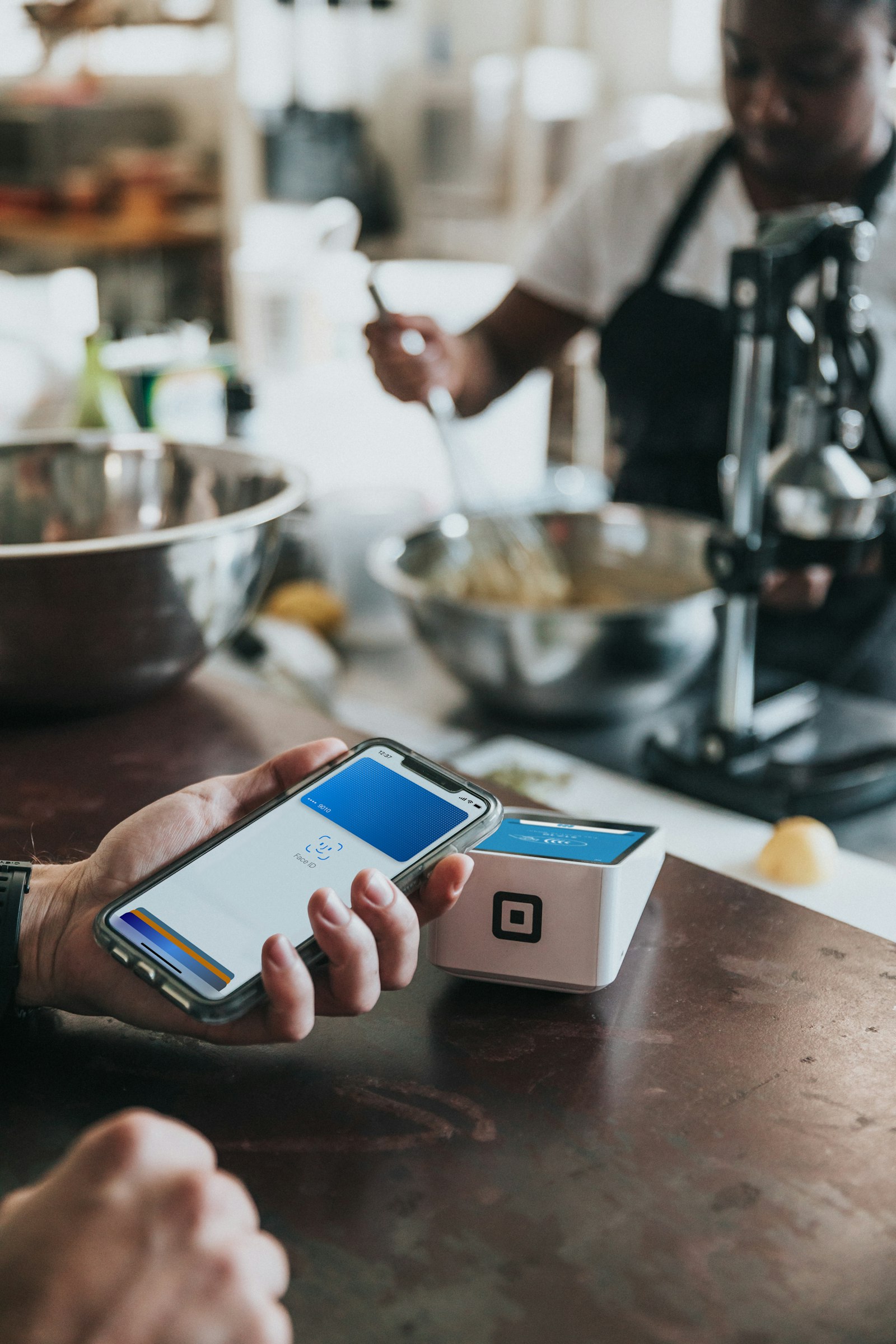
When you hold your phone against a payment terminal, the whole exchange finishes in well under a second, and the store never learns your real card number. That detail surprises many people. NFC tap to pay looks like a simple wave of a device, but it relies on a short-range radio link, a single-use security code, and a stand-in number called a token.
Here is what happens between your phone and the terminal, and why the system is harder to abuse than most people assume.
What NFC Is
NFC stands for near-field communication, a form of short-range wireless technology. It only works when two devices are almost touching, which is why you tap rather than point. That tiny range is a feature: a payment terminal has to be right next to your phone before any data can move, so someone across the checkout line cannot casually reach it.
The same technology also powers transit passes, hotel key cards, and the pairing shortcuts on some speakers and headphones. Payments are just its most familiar use.
What Happens During a Tap
According to EMVCo, the organization behind the global chip-payment specifications, a contactless payment begins when a consumer taps a contactless card or an NFC-enabled device such as a phone, watch, or wristband against the terminal. The chip then communicates with the terminal’s reader to complete the transaction. EMVCo’s contactless quick reference guide adds that a single-use security code is generated for each transaction to help prevent fraud.
That single-use code is the key idea. If someone somehow captured the data from one tap, it could not simply be replayed to make another purchase, because the next transaction needs a fresh code.
Why Your Real Card Number Stays Hidden
For mobile wallet payments, there is a second layer: tokenization. EMVCo explains that payment tokenization replaces the actual card data with a payment token that has no value to a thief. When you add a card to a phone wallet, the card issuer provisions a token that stands in for your account number, and the token is what gets sent at the terminal.
In practice, this gives a phone payment several advantages over handing over a plastic card:
- The merchant sees a token, not your actual card number.
- A leaked token is far less useful to criminals than a leaked card number.
- If you lose the phone, the card issuer can disable the token without replacing the underlying card.
- Most wallets require a fingerprint, face scan, or passcode to authorize the payment, so a stolen phone is not an open wallet.
The exact steps vary between wallet providers and banks, but the principle of substituting a token for the account number is common across the industry.
Cards, Phones, and Watches Compared
Contactless cards and phone wallets use the same underlying standards, so the terminal treats them similarly. The practical differences are on your side:
- Cards are simple and need no battery, but they carry your real account details on the chip and typically skip biometric checks for small purchases.
- Phones add tokenization and a device unlock step, which many security teams consider a meaningful upgrade.
- Watches and wristbands are convenient for quick taps, and they usually need to be unlocked on your wrist before payments are allowed.
If your phone has an unusual battery or software situation, such as being nearly dead, check your wallet’s behavior in advance. Some phones keep a limited payment function available briefly on low power, while others do not, and the policy depends on the manufacturer.
What Tap to Pay Does Not Protect Against
The payment channel itself is well protected, but scammers rarely attack it. They go after you instead. Fake texts that pretend to be your bank, fraudulent payment requests, and look-alike login pages are far more common than anyone skimming a tap in a store. Our guide on how to spot phishing scams covers the warning signs, and the explainer on passkeys shows how modern sign-ins reduce the risk of stolen passwords to your accounts, including the one tied to your wallet.
It also helps to look for the contactless symbol at the checkout, which EMVCo describes as the indicator that a terminal accepts contactless payments, and to keep your phone’s operating system updated so wallet security fixes arrive promptly.
Setting Up Tap to Pay Safely
- Add your card through your phone’s official wallet app, following your bank’s verification step.
- Turn on a screen lock with a biometric or a strong passcode.
- Enable alerts from your bank so unexpected charges stand out right away.
- Learn how to remotely lock or wipe your phone through your device account in case it goes missing.
FAQs
Is NFC tap to pay safe?
It is considered one of the safer ways to pay in person. Each transaction uses a single-use security code, and phone wallets send a token instead of your real card number.
Can someone steal my card details by tapping near my phone?
Not realistically. NFC only works at very short range, a payment needs an authorized terminal, and the data exchanged is a token plus a one-time code rather than reusable card details.
Do I need an internet connection to pay with my phone?
Usually the phone itself does not need a live connection for the tap, because the terminal handles communication with the bank. Behavior can vary by wallet and region, though, so test yours.
What if I lose my phone with cards in the wallet?
Use your device’s find-and-lock feature to disable it remotely, and contact your bank if needed. The wallet normally requires biometrics or a passcode before approving a payment.












Discussion about this post